# Trade System

Source: https://autoplus.gg/docs/trade-system


## Escrow Rules [#escrow-rules]

These rules apply to every transaction handled through AutoPlus escrow.

<ol className="list-decimal list-inside ml-4 space-y-2">
  <li>
    Users are responsible for carefully reviewing all bot prompts and
    confirmations before proceeding, including deal details, payment amounts,
    networks, addresses, usernames, and any other transaction information. Users
    are also responsible for securing access to their Discord account and
    AutoPlus password if one is set. AutoPlus is not liable for losses caused by
    user error, incorrect addresses, wrong networks, compromised accounts,
    mistaken confirmations, or failure to follow instructions. These mistakes
    may result in permanent loss of funds.
  </li>

  <li>
    AutoPlus advocates for neutrality, which means we do not generally forbid
    specific types of trades between users. However, AutoPlus does not endorse
    trades that are unethical, suspicious, fraudulent, unsafe, or against
    Discord's Terms of Service. If a trade appears to violate these rules or
    creates unreasonable risk, staff may withdraw from handling the dispute, and
    the users involved may be required to resolve the matter between themselves.
  </li>

  <li>
    Both parties must remain active and responsive during a transaction or
    dispute. If one party becomes unresponsive, AutoPlus may reserve the right
    to release the funds to the appropriate party based on the available
    information. Funds will not be released before at least 3 hours after a
    dispute is opened, and the usual response timeframe is up to 24 hours
    depending on the situation.
  </li>

  <li>
    Sellers are allowed to set their own terms of service, but these terms must
    be clear, reasonable, and fair to both parties. If a buyer fails to follow
    the seller's terms, this does <strong>not</strong> automatically give the
    seller the right to keep the funds. However, if the buyer's actions create a
    clear loss or risk for the seller, and the terms were clearly communicated
    before the deal, the seller may be entitled to keep the funds. Any abusive,
    hidden, misleading, or unfair terms designed to exploit buyers may be
    overruled by staff.
  </li>
</ol>

## Creating a trade [#creating-a-trade]

There are two ways to start an AutoPlus trade. The first way is to go to the <DiscordChannelMention>escrow</DiscordChannelMention> channel and use the message dropdown which lets you select the cryptocurrency of the deal After the crypto is selected, AutoPlus creates the trade flow inside a private thread. The second way is to use the `/trade <user> <cryptocurrency>` slash command. In which `<user>` is the other party in the deal, and `<cryptocurrency>` is the cryptocurrency used for the trade.

## Supported cryptocurrencies [#supported-cryptocurrencies]

We support the cryptocurrencies and networks listed below, requiring an amount of confirmations before marking funds as received in the escrow.

<SupportedCryptocurrencies />

## Identifying the sender and receiver [#identifying-the-sender-and-receiver]

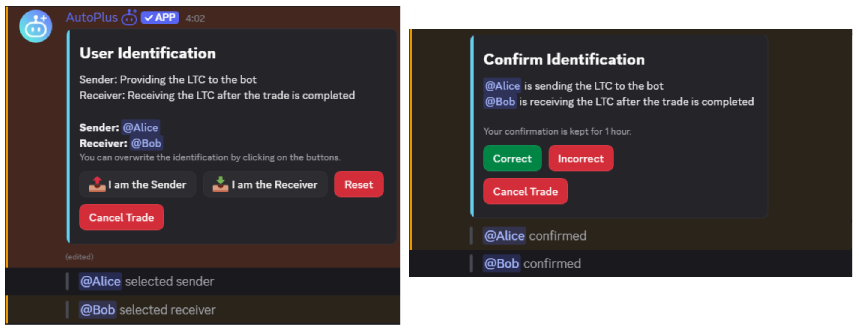
Each user selects `I am the Sender` or `I am the Receiver` in the thread.<br />

* The **Sender** is the user who sends crypto to the escrow.<br />
* The **Receiver** is the user who receives the funds after deal completion.

<Block color="red">
  <p>
    Be careful: only the <strong>Sender</strong> can release funds, and only the{" "}
    <strong>Receiver</strong> can return funds. Make sure both roles match the
    actual deal before moving forward.
  </p>
</Block>

<img src="/trade-system/user-identification.png" alt="User identification role selection." width="906" height="370" className="mt-2 max-w-full md:max-w-[80%] 2xl:max-w-[800px]" />

## Setting trade terms [#setting-trade-terms]

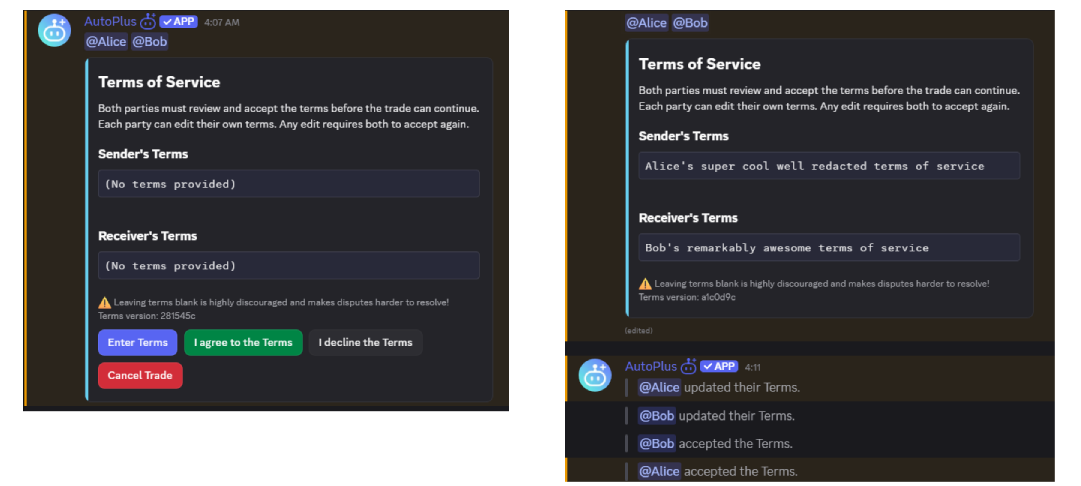
Terms are specified before AutoPlus provides the deposit address. Each side can provide their own terms, shown as Sender's Terms and Receiver's Terms. Both users must agree to the terms before the trade can continue, and once accepted, the terms cannot be modified.

<Block color="blue">
  <p>
    Not providing any terms is discouraged as they make disputes harder to
    resolve. Clear terms give support a better understanding of the deal and
    help resolve issues faster.
  </p>
</Block>

<img src="/trade-system/tos.png" alt="Trade terms." width="1081" height="486" className="mt-2 max-w-full md:max-w-[80%] 2xl:max-w-[800px]" />

## Sending funds into the escrow [#sending-funds-into-the-escrow]

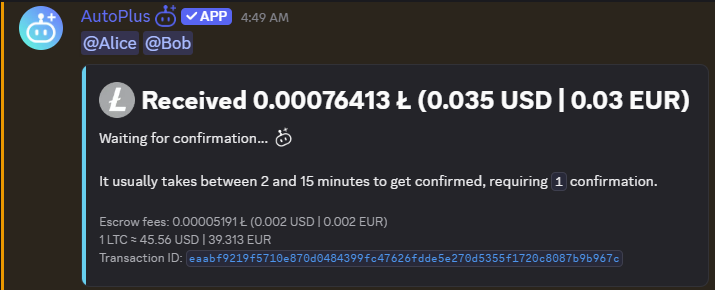
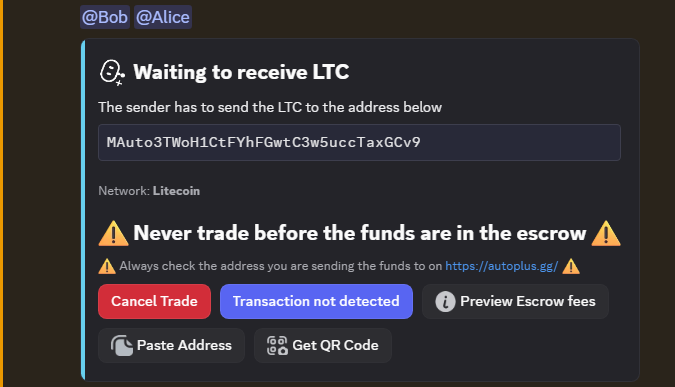
After terms are accepted, AutoPlus provides a deposit address. The **Sender** sends the selected crypto to the shown address and after detecting the transaction, AutoPlus waits for the required confirmations before marking the funds as received in the escrow.
<img src="/trade-system/sending-funds.png" alt="Sending funds into the escrow." width="683" height="379" className="mt-2 max-w-full md:max-w-[80%] 2xl:max-w-[800px]" />

Once the transaction is detected, AutoPlus shows the transaction as **Confirming** until the required confirmations are reached.

<Block color="red">
  <p>
    The <strong>Sender</strong> should not consider the trade funded until
    AutoPlus confirms that the transaction has received the{" "}
    <strong>required number of confirmations</strong>.
  </p>
</Block>

<img src="/trade-system/funds-received-confirming.png" alt="Transaction being confirmed." width="715" height="290" className="mt-2 max-w-full md:max-w-[80%] 2xl:max-w-[800px]" />

## Transaction not detected [#transaction-not-detected]

If the Sender sent the funds but they aren't detected, the **Sender** can use the button `Transaction not detected` which will ask for the transaction ID and it will fetch it.

## Funds received [#funds-received]

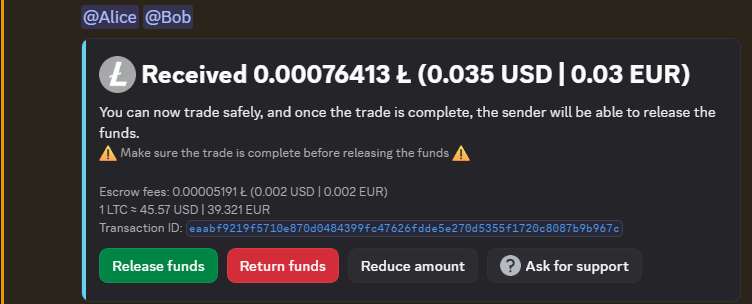
Once the required confirmations are reached, the funds are marked as received. Funds are now held in the escrow. The **Receiver** can now deliver the product, service, exchange, or whatever was agreed.
<img src="/trade-system/funds-received-confirmed.png" alt="Funds received and confirmed in the escrow." width="752" height="304" className="mt-2 max-w-full md:max-w-[80%] 2xl:max-w-[800px]" />

## Releasing funds [#releasing-funds]

Only the **Sender** can release funds. The **Sender** should release only after verifying that the deal was completed correctly. When releasing, AutoPlus asks the **Receiver** to provide an address where they will receive the funds.

<Block color="red">
  <p>
    <strong>
      Never release funds before fully verifying that the deal was completed
      correctly as releasing funds is final.
    </strong>
  </p>
</Block>

## Returning funds [#returning-funds]

Only the **Receiver** can return funds. Returning is used when the deal should not continue or the **Receiver** cannot complete what was agreed. When returning, AutoPlus asks the **Sender** to provide an address where they will receive the funds.

## Reducing the trade amount [#reducing-the-trade-amount]

Reduce amount can be started by both parties. It is used when both users agree that the **Receiver** should receive less than the original escrowed amount. The user selects a new reduced amount, and both parties must agree to the new amount before it is applied. Part of the escrowed funds are returned to the **Sender**, and the trade continues with the reduced amount.

## Asking for support [#asking-for-support]

Both parties can ask for support. Staff gets pinged and involved in the thread, then may review the trade, ask for clarification, and help resolve the issue. After clarification, funds may be force released or force returned depending on the outcome.

## Trade completed [#trade-completed]

After funds are released or returned both of the parties will get a transcript of the trade in their DMs. Your deal will appear on the <DiscordChannelMention>transactions</DiscordChannelMention>, you can hide your username by using the `/settings` command clicking the `Toggle anonymity` button.